
 Tiếng Việt

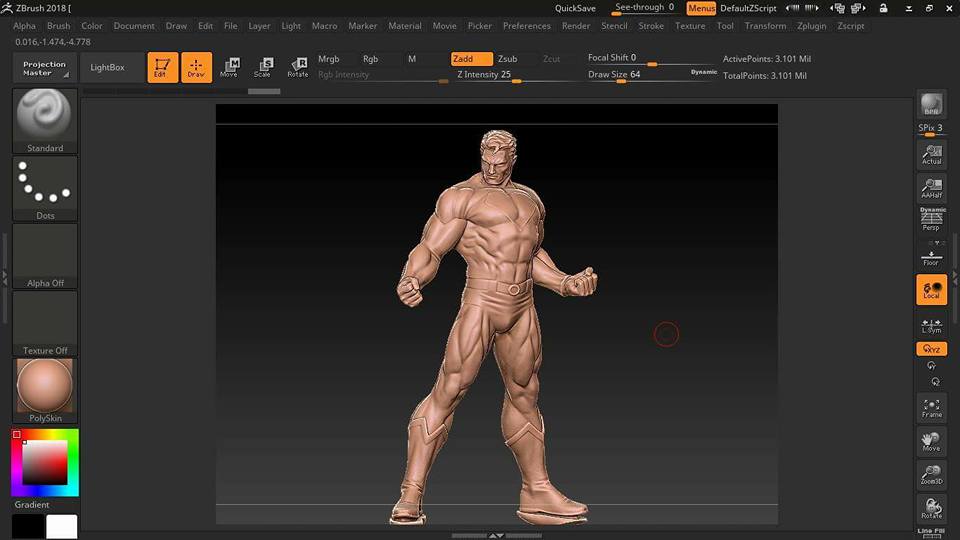
3D scanning a superhero figure with the Einscan Pro Plus handheld 3D scanner. Once the scan is done, the superhero model goes into ZBrush.
3D scanning a superhero figure:

 More 3D scanning projects:
Scanning a supercar frame with the Einscan Pro Plus scanner
Einscan Pro 3D scanner for statues | An automated statue scanning solution.
Using the Einscan Pro Plus color scanner | David Massaroni
Einscan Pro series around the world this past week
3D printing service – Rapid prototyping – Large format – High resolution – Hanoi
Scanning a turtle with a 3D scanner – Einscan Pro Plus
Einscan 3D scanner captures a complete motorcycle
Color 3D scanning on the Einscan scanner – discovery pack option.
More 3D printers:
Cubicon FDM 3D printer and Einstart-C FDM 3D printer
Cubicon 3D printer – desktop 3D printer imported from Korea.
3D printer rental – ABS, PLA and TPU 3D printer rental
Cubicon Lux 3D printer | DLP technology
Ep-M100T metal 3D printer | An affordable metal 3D printer
Cubicon Single Plus budget 3D printer, the market’s hottest pick
Isla-650 Pro SLA 3D printer – Large-format rapid prototyping
EP-M250 SLM metal powder 3D printer
Cubicon Style 3D printer – imported at an affordable price
The first full-color powder 3D printer in Vietnam
Imported budget 3D printers in Vietnam – A reliable 3D printing service
Cubicon Single Plus imported budget 3D printer
Skytech large-format 3D printer – Taiwan
Open links: 3d printing rapid prototyping 3d printer 3d scanning machine cnc machine 3d scanner cmm machinestone cnc machine 2d measuring machine 3d cmm stone carving machine stone cnc machining 3d printing service 3d scanning service concept design service concept design service reverse engineering service machine rental service 3d printer rental 3d scanner rental 3d scanning machine rental reverse engineering training
Tao Mau Nhanh is happy to help you learn about 3D printers.
Contact CT3D Group
CT3D Group – professional 3D printing, 3D scanning, design and rapid prototyping services nationwide.
- CT3D Thu Duc – Ho Chi Minh City, Hanoi, Hai Phong: in3d.edu.vn – Hotline 0975 008 728 (Mr. Thai)
- CT3D District 6 – Ho Chi Minh City: 3dmaker.vn – Hotline 038 7798308 (Mr. Phuc)
Combining 3D scanning and digital sculpting: a modern character prototyping workflow
For models, toys and character figures, 3D scanning is usually the starting point, not the end. Scan data from a clay sculpt, a wax model or an existing statue goes into digital sculpting software such as ZBrush, where an artist refines it: sharpening muscles, fixing the pose, adding armor details and patterns, or changing proportions. This approach keeps the feel of the hand sculpt while adding the flexibility of digital tools.
A typical workflow looks like this:
- 3D scan the original with a handheld scanner or turntable.
- Process the mesh: merge, fill holes and reduce the triangle count to keep it light.
- Import it into the sculpting software and remesh it for an even, easy-to-edit mesh.
- Refine the details and split the parts for easier printing and assembly.
- 3D print the model in resin to check it, then make a silicone mold for copies.
Technical tips for bringing scan data into sculpting software
Raw scan meshes are usually very heavy with uneven triangle density, so remesh them or use mesh rebuilding tools before sculpting to get a uniform structure. Thin areas such as fingers, weapons and hair often lose data during scanning, and artists usually have to rebuild them by hand. Also watch the minimum wall thickness when preparing print files: details that are too thin will break during printing or demolding.
From digital file to production run
Once the file is finished, the master model is usually printed in resin for a smooth surface, then used to make a silicone mold. From that mold you can cast copies in resin, polyresin or composite in small to medium runs, which works well for display statues, gifts and collectible models.
If you have a character model to digitize, edit and replicate, check out CT3D’s SLA resin 3D printing service for crisp master prints, or call the Hotline/Zalo 0975 008 728 for advice on the whole process.
Frequently asked questions
Can ZBrush open 3D scan files directly?
Yes, ZBrush imports common mesh formats such as OBJ and STL. Raw scan files are usually very heavy, though, so reduce the triangle count or remesh first to keep sculpting smooth.
Why scan a model instead of sculpting digitally from scratch?
Scanning keeps the shapes and feel of the hand sculpt and saves time on blocking out the basic forms. For portrait statues or existing models, scanning and then editing is usually faster and truer to life than starting from scratch.
Can a model edited in ZBrush be 3D printed right away?
It usually needs a few more checks. The file must be a watertight mesh with no self-intersections and enough wall thickness to print, and large parts should be hollowed or split to save material. After checking, you can export an STL for printing.
Which printing technology is best for character models?
For character models with many small details, SLA or DLP resin printing usually gives the smoothest, sharpest surface. FDM is better for large, low-cost models, but layer lines are visible and need more surface finishing.
Related services at CT3D Group
- High-accuracy 3D scanning service
- Custom 3D printing service
- Custom 3D design service
- CT3D Group network: ct3dgroup.com · in3d.edu.vn – Hotline/Zalo 0975 008 728

