
 Tiếng Việt

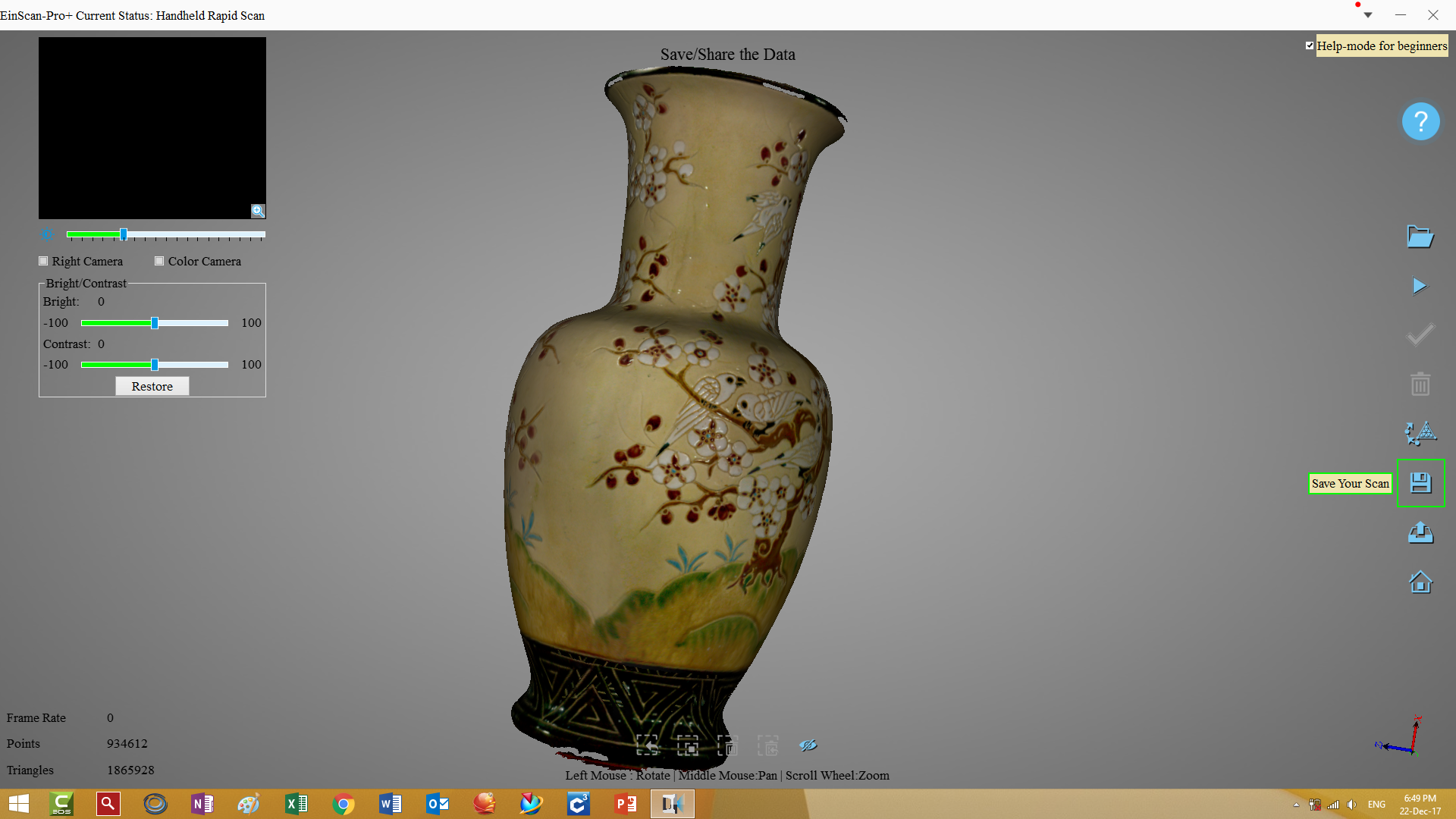
The EinScan Series 3D scanners have received a software update that greatly improves color scanning and speeds up scanning. Coming soon is the integration of Siemens Solid Edge ST10 reverse engineering software, which will make the EinScan 3D scanning package even more powerful.The EinScan Series 3D scanners have received a software update that greatly improves color scanning. The software upgrade also makes scanning faster. Coming soon is the integration of Siemens Solid Edge ST10 reverse engineering software, which will make the EinScan 3D scanning package even more powerful.
Watch 3D scanning videos from the EinScan Pro Plus 3D scanner:
In handheld mode, the EinScan Pro Plus 3D scanner can capture many large objects at amazing speed. 3D scanning wood is also much faster, with better point and profile capture. Video 1: Video 2: See some high-definition color 3D scanning images. Scanning video:
Scan results:
Scanning video:
Scan results:

CONTACT
Tags: color 3D scanner 3D scanner with color #Tag: metal 3D printer, dental 3D printer; metal dental 3D printerSee more 3D scanners:
- 3D scanners for 3D inspection.
- 3D scanners for reverse engineering.
- 3D scanners for wood.
- 3D scanners for paintings.
Contact CT3D Group
CT3D Group – Professional 3D printing, 3D scanning, design and rapid prototyping services nationwide.
- CT3D Thu Duc – Ho Chi Minh City, Hanoi, Hai Phong: in3d.edu.vn – Hotline 0975 008 728 (Mr. Thai)
- CT3D District 6 – Ho Chi Minh City: 3dmaker.vn – Hotline 038 7798308 (Mr. Phuc)
The role of software in a 3D scanning system
A 3D scanning system has two parts: hardware (cameras, light source, turntable) and software. The hardware sets the accuracy limit, but the software decides how fast data is aligned, how well color is handled, the quality of the final mesh and how easy the system is to use. That is why software updates often bring clear improvements without replacing the scanner.
A typical data workflow from scanning to design uses three groups of software:
| Software group | Function | Output |
|---|---|---|
| Scanning software | Controls the scanner, aligns data, processes color, creates meshes | STL, OBJ, PLY |
| Mesh processing software | Cleans up, fills holes, decimates, aligns coordinates | Watertight, optimized mesh |
| Reverse engineering / CAD software | Extracts planes, cylinders and freeform surfaces; builds solid models | STEP, IGES, native CAD files |
Tips for getting the most out of scanning software
- Update to stable versions: updates usually improve alignment and color processing; back up your projects before upgrading.
- Choose the right resolution: very high resolution on large objects makes files heavy and slow to process without adding real value.
- Split projects by scan group: this makes them easier to manage, merge when needed and less prone to data loss.
- Make sure your computer is up to spec: a dedicated graphics card and plenty of RAM keep processing smooth, especially with color data.
- Keep the raw data: save the raw scans before cleanup so you can reprocess them if needed.
For many companies, the hardest step is not scanning but turning the mesh into an editable CAD model. If you do not have staff skilled in reverse engineering software, consider a reverse engineering service from 3D scan data to get production-ready CAD files.
Frequently asked questions
Does a software update make a 3D scanner more accurate?
It usually does not change the hardware’s accuracy limit, but it can improve alignment quality, reduce noise and speed up processing. As a result, the final output is often noticeably better.
How is scanning software different from reverse engineering software?
Scanning software captures data and creates meshes, while reverse engineering software uses that mesh to build a parametric CAD model. The two are usually used one after the other in the same workflow.
How much larger are color scan files than non-color files?
Usually much larger, because they also store texture images or per-vertex color. If you only need geometry for design, export without color for faster processing.
Can an office computer run 3D scanning software?
It can handle small datasets, but it is usually slow and prone to freezing with large or color data. Use a workstation with a dedicated graphics card as recommended by the manufacturer.
Related services at CT3D Group
- 3D scanning service – high-accuracy 3D scanning
- On-demand 3D printing service
- Custom 3D design service
- CT3D Group network: ct3dgroup.com · in3d.edu.vn – Hotline/Zalo 0975 008 728

