
 Tiếng Việt


The Cubicon 3D printer ( affordable imported 3D printer ) comes with licensed 3D printing software designed by HyVISION. It makes setting print parameters easy, and the licensed Cubicreator software also generates support material in a smarter, more economical way.
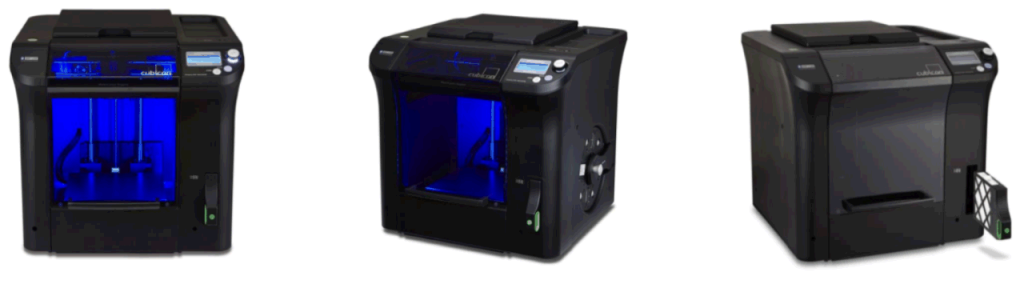
Cubicon 3D printer – Sleek design
Cubicon has four main 3D printer lines: the Cubicon Style, the Cubicon Single 2016, the Cubicon Single Plus 2016 and the Cubicon Lux. All of them are developed by HyVISION, made 100% in Korea and distributed exclusively in Vietnam by 3D Vietnam. Cubicon printers stand out for their design, special features and high safety. On top of that, all 03 of these printer lines use the licensed Cubicreator 3D printing software.
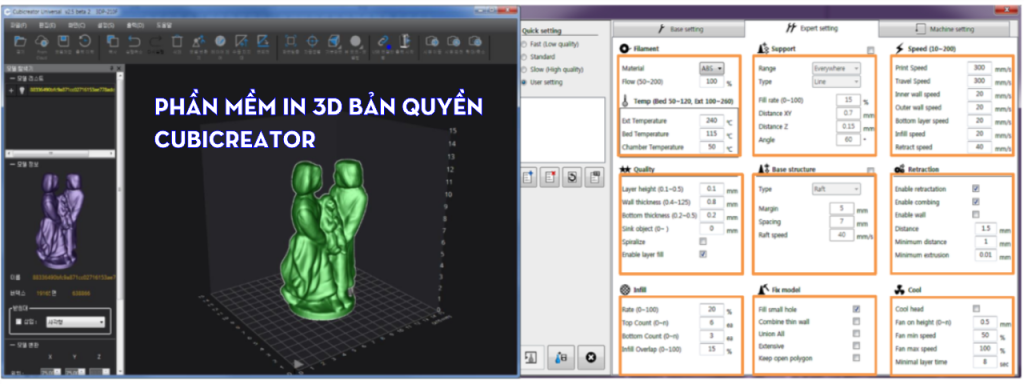
Cubicreator licensed 3D printing software – HyVISION
What do you gain from using the licensed Cubicreator 3D printing software?
- Faster print setup: Cubicreator sets print parameters automatically for each material (ABS, PLA, TPU) to suit your print job. That saves over 70% of the time you would spend setting these parameters in ordinary software.
- Smarter support material: You can place “Support Material” yourself and adjust it to fit your needs. Surfaces that touch the “Support Material” come out smoother than with ordinary software.
In short:
You will save over 70% of print setup time and get better-looking parts than with ordinary 3D printers. You are a smart buyer. I trust you will make the right choice and bring real value to your company.
Contact us now for advice!
| INFORMATION | 3D Vietnams Company – 3D Vietnam |
| Phone | 0975 008 728 |
| Mobile | 0975 008 728 |
| contact@ct3dgroup.com | |
| Address | 7749 Vo Van Ngan, Ho Chi Minh City. |
Contact CT3D Group
CT3D Group – Professional 3D printing, 3D scanning, design and rapid prototyping services nationwide.
- CT3D Thu Duc – Ho Chi Minh City, Hanoi, Hai Phong: in3d.edu.vn – Hotline 0975 008 728 (Mr. Thai)
- CT3D District 6 – Ho Chi Minh City: 3dmaker.vn – Hotline 038 7798308 (Mr. Phuc)
What does slicing software do in 3D printing?
A 3D printer cannot read a design file directly. Slicing software splits the 3D model into hundreds or thousands of thin layers, works out the nozzle path for each layer and exports a command file (usually G-code) for the machine to run. So with the same printer and the same plastic, part quality can vary a lot depending on how the software is set up.
Software from the printer maker usually comes with optimized profiles for each material, so beginners can start printing right away. Other popular slicers allow deeper customization and suit experienced users who want to fine-tune every setting.
Key settings to know
| Setting | Affects | Tip |
|---|---|---|
| Layer height | Surface smoothness and print time | Thin layers for display models, thick layers for quick prototypes |
| Wall/shell thickness | Strength and how well the surface can be sanded | Add more perimeters for load-bearing parts |
| Infill density | Stiffness, weight, amount of plastic | Low density for display models, higher density for functional parts |
| Nozzle and bed temperature | Layer adhesion, bed adhesion, warping | Follow the filament maker’s recommendations and fine-tune with test prints |
| Support material | Ability to print overhangs, quality of the underside | Place supports only where needed and adjust the gap so they come off easily |
Tips for better surfaces with supports
- Rotate the model to minimize overhangs that need support.
- Use tree supports for art models to reduce contact marks.
- Add support blockers on surfaces where looks matter.
- Split complex models into several parts, print them separately and assemble.
If you need good-looking parts but don’t want to spend time tuning settings, CT3D’s 3D printing service can help from file preparation to finished part. Contact Hotline/Zalo 0975 008 728.
Frequently asked questions
Is the printer maker’s software better than free software?
The maker’s software is usually pre-tuned for its own machines and materials, so it is easy to use and causes fewer problems for beginners. Popular free software has more advanced options and a large support community. The best choice depends on your experience and how much you want to customize.
Why do printed parts have rough marks where they touch the supports?
Marks appear when the gap between support and part is too small, so the support sticks hard and leaves fuzz when removed. Slightly increasing the Z gap, using a support interface layer and lowering the temperature in that area will improve the surface. The most effective fix is to orient the print so important faces need no support.
How much infill is enough?
For display models, low infill is usually stiff enough and saves plastic. Load-bearing functional parts should use more infill and especially more shells, because strength depends heavily on the outer walls. Parts that must take maximum load can be printed fully solid.
Can one G-code file be used on different printers?
Usually not, because G-code contains machine-specific settings such as bed size, temperatures, speeds and start commands. Using the wrong G-code can crash the nozzle into the bed or ruin the print. Keep the original STL or 3MF file and re-slice it with the correct machine profile.
Related services at CT3D Group
- Custom 3D printing service
- High-accuracy 3D scanning service
- Custom 3D design service
- CT3D Group network: ct3dgroup.com · in3d.edu.vn – Hotline/Zalo 0975 008 728

