
 Tiếng Việt


Cubicon 3D printers are imported brand-new and factory-sealed from Korea. They are affordable, mid-range 3D printers that suit any small or medium business in Vietnam. They are not as expensive as Stratasys machines, yet Cubicon printers turn out parts just as good as other high-end printers. On top of that, Cubicon printers are very safe for your health.
What’s inside the Cubicon Single box?
HyVISION is a trusted maker of desktop machines. The accessories and materials that come with a Cubicon are complete and carefully put together down to the last detail.
Opening the box and taking out the Cubicon Single 2016 printer.
Assembling and running a Cubicon printer is very simple. There is also a detailed set of tutorial videos, and 3D Vietnams experts will be by your side to help you make beautiful, high-end 3D prints.
How to install the burnt-plastic odor filter in a Cubicon printer. The filter removes 100% of the burnt plastic smell produced during printing, and it is what makes the Cubicon system so safe.How to load filament into the 3D printer – it couldn’t be easier.
The Cubicon printer can print with 03 types of plastic:
- PLA: a common plastic for 3D printing.
- ABS: this plastic is fairly hard to prototype with on a 3D printer, but with Cubicon it is easy.
- TPU: a flexible plastic. Not every 3D printer can handle it.
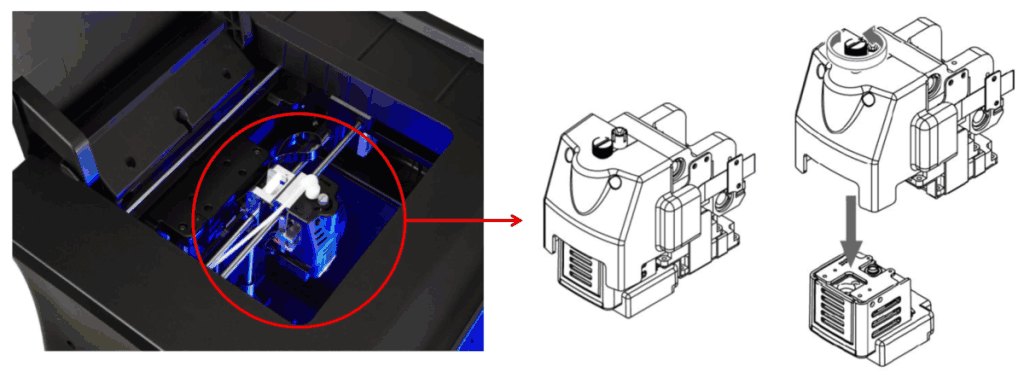
The Cubicon 3D print head is very easy to remove and install,
and loading filament is just as easy.
Make your first 3D print with Cubicon
For advice, please call us now:
| INFORMATION | 3D Vietnams Company – 3D Vietnam |
| Phone | 0975 008 728 |
| Mobile | 0975 008 728 |
| contact@ct3dgroup.com | |
| Address | 7749 Vo Van Ngan, Ho Chi Minh City. |
Contact CT3D Group
CT3D Group – Professional 3D printing, 3D scanning, design and rapid prototyping services nationwide.
- CT3D Thu Duc – Ho Chi Minh City, Hanoi, Hai Phong: in3d.edu.vn – Hotline 0975 008 728 (Mr. Thai)
- CT3D District 6 – Ho Chi Minh City: 3dmaker.vn – Hotline 038 7798308 (Mr. Phuc)
Basic steps for running a desktop FDM 3D printer
The videos on unboxing, installing the filter and loading filament are just the start. For stable printing over the long run, users should learn the standard operating routine below:
- Check the machine before printing: the bed is clean with no leftover plastic, the nozzle has no burnt plastic stuck to it, and there is enough filament for the print.
- Load filament correctly: cut the filament end at an angle and push it into the extruder until plastic flows evenly from the nozzle; with TPU, lower the extrusion speed.
- Slice the file: pick the right material profile, layer height and infill density, and turn on supports for overhangs.
- Watch the first layer: most print failures start with the first layer; watch the first few minutes to catch bed adhesion problems or no extrusion early.
- Remove the part and clean up: let the bed cool a bit before removing the part to avoid scratching the bed or warping the part.
Common FDM printing problems and how to fix them
| Problem | Common cause | Fix |
|---|---|---|
| Part comes loose from the bed | Dirty bed, first layer too high, bed temperature too low | Clean the bed, re-level it, raise bed temperature, add a brim |
| No extrusion or intermittent extrusion | Clogged nozzle, wet filament, extruder slipping | Clean the nozzle, dry the filament, adjust extruder tension |
| Stringing on the surface | Temperature too high, not enough retraction | Lower temperature, increase retraction distance |
| Layer shift | Loose belt, print head collision | Re-tension the belt, check for obstructions |
| Corner warping (ABS) | Shrinkage from temperature differences | Use an enclosure, avoid drafts |
Also store filament in a sealed box with desiccant packs, and clean and lubricate the motion rods regularly. When you need strong engineering plastic parts with consistent mechanical properties that a desktop FDM printer can’t deliver, check out the MJF PA12 3D printing service for functional parts.
Frequently asked questions
How often should I clean a 3D printer nozzle?
There is no fixed schedule; it is usually worth checking after every few spools or when switching materials. If extrusion looks weak or the print surface has gaps, clean it right away.
Can I print with wet filament?
You can, but the quality is poor: you will hear popping, the surface gets pitted and the part turns brittle. Dry the filament at the right temperature for that plastic before printing.
What do I need to do when switching from PLA to ABS?
Purge the old filament from the nozzle by pushing new filament through at a higher temperature, then adjust the nozzle temperature, bed temperature and slicer profile for ABS. Use an enclosure when printing ABS.
Does the air filter on a 3D printer need to be replaced?
Yes. Activated carbon and dust filter cartridges lose effectiveness with use, so replace them regularly as the manufacturer recommends.
Where can I get 3D printing technical support?
Contact CT3D via Hotline/Zalo 0975 008 728 or email contact@ct3dgroup.com for advice on operation, materials and 3D printing services.
Related services at CT3D Group
- Custom 3D printing service
- High-accuracy 3D scanning service
- Custom 3D design service
- CT3D Group network: ct3dgroup.com · in3d.edu.vn – Hotline/Zalo 0975 008 728

