
 Tiếng Việt


3D SCANNERS use several different scanning technologies: structured light, laser, touch probes and more. Most 3D scanners use structured light technology. They offer good accuracy and suit many different jobs. Some 3D scanners cover a wide range of uses by changing lenses. Recently, to save users money, Shining 3D developed a 3D scanner with adjustable lens positions, so you no longer have to buy several lens sets as before.
Introducing the OptimScan 3D SCANNER:
The OptimScan 3D scanner was developed by Shining 3D (Hangzhou, China). Backed by strong financial resources, the company acquired technologies from Europe (especially Germany, the cradle of high-precision industrial engineering). It then built a factory in Hangzhou to manufacture scanners from components supplied from around the world.OptimScan 3M 3D scanner:
| Model | OptimScan-3M |
| Single Shot Accuracy | 0.007-0.025 mm |
| Volume Accuracy | 0.1 mm/m |
| Single Scan Speed | < 2 s |
| Point Distance | 0.048-0.192 mm |
| Single Scan Range | 100x 75 mm /200×150 mm / 400×300 mm |
| Scan Depth | 100-400 mm |
| Camera Resolution | 3.0 MPx2 |
| Light Source | Blue light ( LED ) |
| Scan Type | Non-contact structure light scanning |
| Alignment | Reference points auto-alignment / manual alignment |
| Output Data Format | STL, ASC, DGM, OBJ, etc., and compatible with the mainstream 3D software |
| PC Configuration Requirement | CPU: Intel core i7 3770 or better Display card: NVIDIA GeForce GT 670 or better Memory : 8G DDR3 1600 or better |
| OS System Support | win10 64bit |
| Operation Temperature | 0 – 45 °C |
OptimScan 5M 3D scanner:
| Model | OptimScan-5M |
| Single Shot Accuracy | 0.005-0.015 mm |
| Volume Accuracy | 0.08 mm/m |
| Single Scan Speed | < 1.5 s |
| Point Distance | 0.04-0.16 mm |
| Single Scan Range | 100x 75 mm /200×150 mm / 400×300 mm |
| Scan Depth | 100-400 mm |
| Camera Resolution | 5.0 MPx2 |
| Light Source | Blue light ( LED ) |
| Scan Type | Non-contact structure light scanning |
| Alignment | Reference points auto-alignment / manual alignment |
| Output Data Format | STL, ASC, DGM, OBJ, etc., and compatible with the mainstream 3D software |
| PC Configuration Requirement | CPU: Intel core i7 3770 or better Display card: NVIDIA GeForce GT 670 or better Memory : 8G DDR3 1600 or better |
| OS System Support | win10 64bit |
| Operation Temperature | 0 – 45 °C |
3D scanning large parts:

3D scanning small parts:
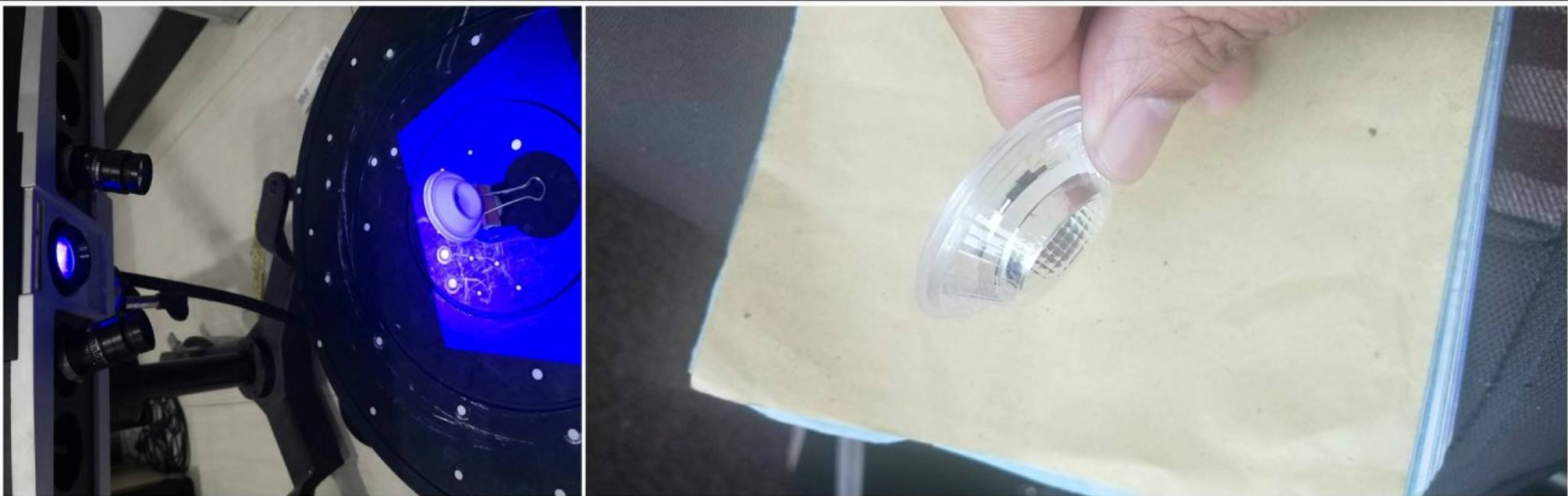

Main applications:
3D scanning / scan 3D / 3D scanner / handheld 3D scanner / affordable 3D scanner
Contact CT3D Group
CT3D Group – professional 3D printing, 3D scanning, design and rapid prototyping services nationwide.
- CT3D Thu Duc – Ho Chi Minh City, Hanoi, Hai Phong: in3d.edu.vn – Hotline 0975 008 728 (Mr. Thai)
- CT3D District 6 – Ho Chi Minh City: 3dmaker.vn – Hotline 038 7798308 (Mr. Phuc)
Understanding structured-light 3D scanner specs
3D scanner spec sheets often include figures that are easy to confuse. Knowing what each one means helps you pick the right equipment or set the right requirements when hiring a service:
- Single shot accuracy: the error within a single scan area, reflecting hardware quality and calibration.
- Volume accuracy: the error that builds up along the length of the object, usually given in mm/m. This is the key figure when scanning large objects.
- Point distance: the point density on the surface; the smaller it is, the more clearly fine details are captured.
- Scan range: the size of the area captured in one shot; a small range gives fine detail, a large range scans big objects quickly.
Having several scan ranges on the same scanner is exactly why it can handle both large and small parts: fine details use a narrow range, while large objects use a wide range together with reference markers.
Choosing a scanning approach by size and purpose
| Object | Typical approach | Note |
|---|---|---|
| Small, detailed parts (jewelry, small gears) | Narrow scan range, turntable | Prioritize high point density |
| Medium mechanical parts | Medium scan range, markers | Balance speed and accuracy |
| Large objects (molds, car bodies, statues) | Wide scan range, handheld scanner or photogrammetry | Control volume error |
For quality inspection, the scan data is aligned with the original CAD file to produce a color deviation map. Companies without dedicated equipment can use a 3D inspection service with a 3D scanner to get deviation reports without buying a machine.
Before scanning, talk clearly with the technician about how the data will be used, the surface material and the areas that need the highest accuracy. A clear brief helps choose the right scan range, avoid rescans and shorten data processing.
Frequently asked questions
What are the advantages of blue light 3D scanners over white light?
Blue light is usually less affected by ambient light and gives better contrast on many surface types. As a result, the data is often cleaner and more stable, especially when scanning mechanical parts.
How important is volume accuracy when scanning large objects?
Very important, because small errors at each alignment add up along the length of the object. For objects several meters long, combine reference markers or a photogrammetry system to control the total error.
What computer specs does a desktop 3D scanner need?
It usually needs a powerful CPU, a dedicated graphics card and plenty of RAM to process point clouds. Follow the manufacturer’s recommended specs for each software version.
Can exported 3D scan files be opened in common CAD software?
Yes. Formats such as STL, OBJ and ASC are generally supported by popular CAD and reverse engineering software. However, for parametric editing, the data must be rebuilt as a solid model.
Related services at CT3D Group
- 3D scanning services – high-accuracy 3D scanning
- On-demand 3D printing services
- Custom 3D design services
- CT3D Group network: ct3dgroup.com · in3d.edu.vn – Hotline/Zalo 0975 008 728

